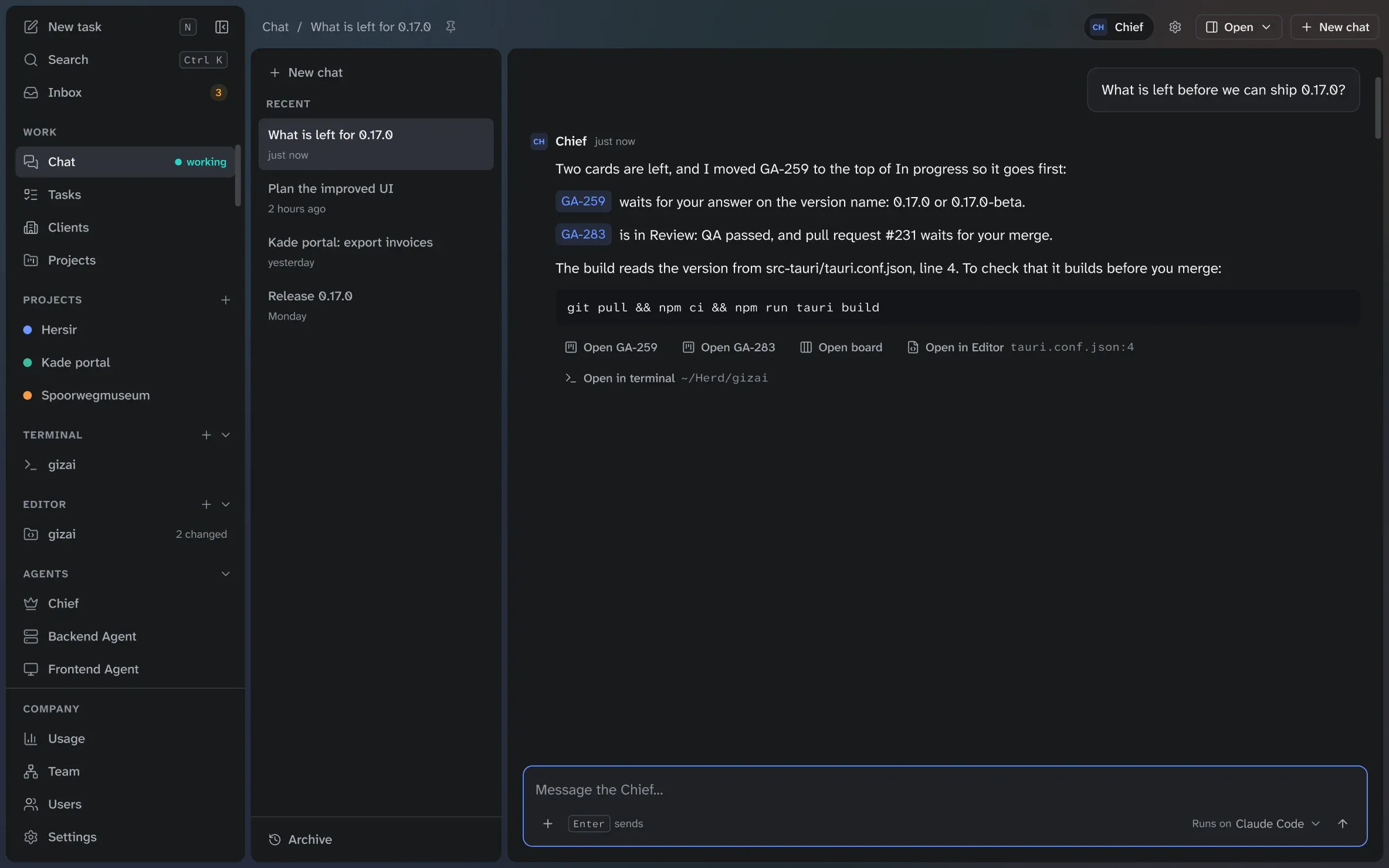
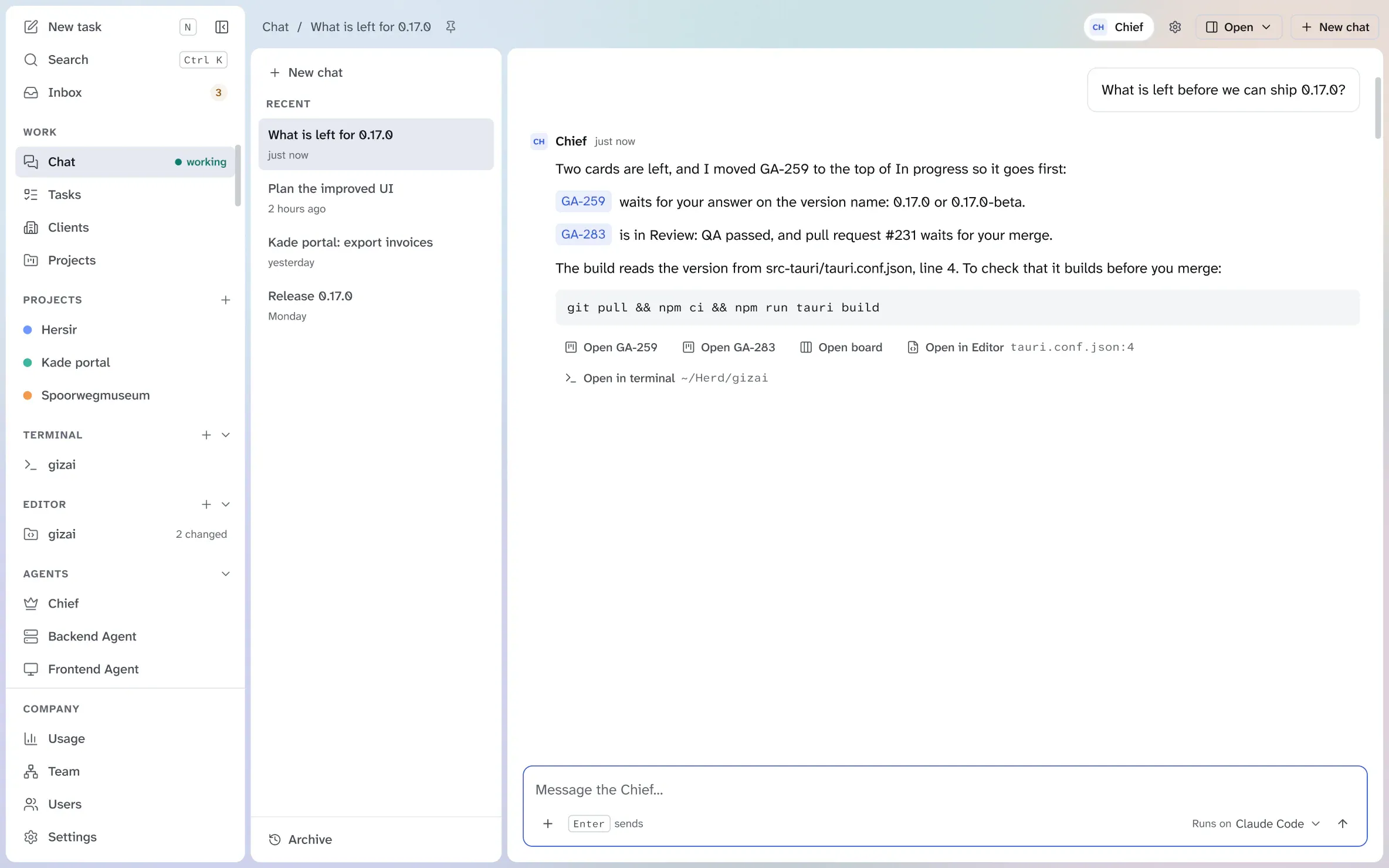
The Chief
The Chief is the agent you chat with: it looks after your board for you, and answers what it can of the other agents’ questions before they reach you.
What it can do
The Chief manages clients, projects, cards and agents with Hersir’s own tools. In a chat it can:
- make and change clients, projects, cards and docs, and comment on and move cards;
- archive cards in Done when you ask, and restore them (below);
- split bigger work into cards that build on each other, so they start in order by themselves (below);
- start and continue agents’ runs, and add or change agents and columns;
- attach a file you gave it to a card, project or client;
- read the files on a client, project or card, in a copy of each in its own folder: text, PDFs and images, Word, Excel, PowerPoint, OpenDocument and RTF files through a readable copy of their text, and Pages, Keynote, Numbers, .doc and .ppt files through a PDF copy when LibreOffice is installed (below); not a file over 100 MB;
- read and keep notes in memory;
- update a project’s linked folder, after your yes;
- merge a pull request that QA passed, in a project where you allow it (The Chief may merge).
Its chat runs on Claude Code (Bring your own CLI).
On a new install, the first start ends in a welcome chat: the Chief welcomes you, says in a few lines what it and the team can do, and asks whether you’d like help setting up agents, clients, projects, tasks or anything else (First start).
The chat
- Runs on, under the text box, moves one chat to another Claude Code account (Settings → Coding CLIs), for example when one is near its weekly limit. The new account gets the conversation handed over, and the chat notes the switch. An answer that hits a usage limit offers Answer on another account.
- A queue: messages you send while the Chief answers wait in a queue and go together when the answer is done. After a stopped or failed answer they wait for Send now.
- Recent and Archive: Recent shows the 30 chats with the newest activity. Archive, under the list, shows every chat, newest first, and searches their titles and the messages you and the Chief wrote. No chat is hidden or deleted: a new message in an old chat moves it back to the top of Recent.
- Pinned: Pin to the top keeps a chat under Pinned, above Recent, until you unpin it, also when it is older than the 30 in Recent: for a chat you want to come back to. The pin button is beside each chat on the left (when you point at it or tab to it), in a chat’s top bar and on each row of Archive; on a pinned chat it says Unpin. The chat pinned last is at the top. A pinned chat isn’t listed again under Recent; Unpin puts it back there when it is one of the 30 newest, else it is in Archive. Pins are kept with your data, so they stay after a restart and are in backups.
- A long chat opens and scrolls like a short one: only the messages in sight, and a few around them, are on the page. So the window’s Find (Ctrl+F) only finds words in those; to find a message further up or down, search in Archive.
- Files: + next to the text box adds files to a message (Add files, or drop them on the Chat page) or links an item. An image on the clipboard, such as a screenshot, pasted into the text box (Ctrl+V, Cmd+V on macOS) is added as a file too,
pasted-image-<date>_<time>.png; a paste with text pastes the text, as before. A message’s files are kept with it; the Chief reads a copy of each in its own folder (Files it reads as text) and can attach one to a task, project or client. Word, Excel, PowerPoint, OpenDocument and RTF files also get a text copy for the Chief, with headings, lists and tables as Markdown. Pages, Keynote, Numbers, .doc and .ppt files get a PDF copy instead, when LibreOffice is installed. - A terminal beside the chat: Open, next to New chat, starts a terminal in a folder you pick, in the side panel on the right of the conversation, so you can run the commands the Chief asks for without leaving the chat. Each chat keeps its own, and the tool strip on the window’s right edge shows or hides them (Terminals in the Chat).
- Cards beside the chat: a click on a card’s chip in the chat (GA-259) opens the card in a Card tab in the side panel, or shows its tab when it is open already; Ctrl+click (Cmd+click on macOS) opens the card’s page instead. On the Chat page the chip’s hover card says Click to open beside the chat. A chat the Chief started about cards (a board check’s question) opens them as Card tabs the first time you open it, the first one shown; once you close them or hide the side panel, the chat opens as you left it, also after a restart. See Cards beside the chat.
- Open in terminal under an answer: when the Chief asks you to run commands (in code after Run, or in a sh code block), Open in terminal shows under its answer, with the folder the answer names, such as
~/Herd/shop: a project’s folder or a folder in your Editor folders, also when it names a folder or a file inside one. A click opens a terminal in that folder beside the chat; a second click shows the same one while it waits for a command. An answer that names no such folder has Open in terminal…, which asks for the folder. It never types or runs anything for you: the terminal starts in the folder and waits for you.
Link anything with @
@ in the chat and in every Markdown text box links a task, project, client, agent, person or doc.
- Only @ lists the kinds,
@task.(and the others) one kind, and typing searches by ID, key or name. @task.shows the tasks under a heading per column, in the board’s order.- The link shows as a chip with the item’s name, which opens the item (Ctrl+click while you edit).
Approve with one click
Once a chat used a tool from outside Hersir (an MCP server, the web, the browser), what that tool returned stays in the chat’s session and could steer the Chief. So the chat keeps a mark: for the rest of the chat, also in later messages, in a new session and after a restart of Hersir, what the Chief does there waits for your Approve. The chat says so once, when it is marked: “This chat used <tool>, a tool from outside Hersir: from now on, what the Chief does here waits for your Approve.”, with the tool in words, like search on the otus server or fetching a web page. Above the text box, a marked chat keeps saying it: “This chat used <tool>, a tool from outside Hersir: what the Chief does here waits for your OK.”, with New chat beside it. A new chat starts unmarked, without that line.
A tool the Chief doesn’t have marks nothing. A chat answer has Read, Glob and Grep, web search and fetching pages while Web is on, and the tools of the MCP servers and the browser it gets (agent form → Tools). When the Chief calls any other tool, like Bash, Edit or a tool of a server it doesn’t have, Claude Code refuses the call without running it (“No such tool available”), so nothing came in from outside: the chat isn’t marked and says nothing about it.
The Chief’s calls that wait start or continue runs, change agents or columns, attach a file, update a linked folder, save to memory, merge a pull request, archive cards, comment on a card, change a card’s title, description, acceptance criteria, assignee or the cards it builds on (in a column that isn’t Auto; in an Auto column the card waits on hold instead, below), give a card’s hold a new reason, change a project’s repository, folder, main branch or goal, or add a project with any of those. A change to a project’s name, colour, status, client or Test runs at once applies at once, and so do a new project without them and restoring archived cards, which only undoes an archive. A chat the Chief starts from a marked chat, or a waiting chat it writes in from there, is marked too, as its message could carry what the outside tool returned: it says “The Chief wrote here from a chat that used <tool>, a tool from outside Hersir: from now on, what the Chief does here waits for your Approve.” Each call that waits shows under the answer that tried it:
- with a line about what it does and a preview: a note’s new text and what changes, the card and agent, the settings that change, the file and where it goes, the comment’s text, each field of a card or project that changes, old and new, and the cards an archive takes, like “Archive 683 cards in Done” (one card: “Archive GA-12”), with the ones it would skip and why;
- with Approve and Discard, and Approve all when there are several.
The Chief’s tool line says what happened to each call: one that worked reads as before, like “Changed task DU-37”; one that waits for you reads “Waiting for your OK: add to note Chief/Notes”; one that was refused reads “Couldn’t change task DU-37”, with the reason under it.
Approve runs exactly that call once, with every other rule in force; it isn’t kept again, and a card it changes doesn’t go on hold. Discard runs nothing. The chat notes what happened and the Chief hears it in its next answer. Approving doesn’t start a new answer: once nothing waits and the Chief isn’t answering, a last note says its answer is done, so send a message to go on. Until you decide, the chat waits for you at the top of the Inbox, also after a restart.
Tools that only read never wait, and a chat that never used a tool from outside Hersir works as before.
Sources you trust
Like Claude’s connectors, each source the Chief has gets a choice in its agent form → Tools: each MCP server, the browser and Web show After the Chief uses it: with Ask for my OK or Allow. Every source starts on Ask for my OK, also one saved before this choice existed, and only the agent form changes it: the Chief can’t, from chat (update_agent with trusted or webTrusted is refused, and nothing changes). Other agents’ forms don’t show it.
- Ask for my OK (the default): after the Chief uses the source, the chat is marked and its calls wait for your Approve, as above.
- Allow: its tools don’t mark the chat, so what the Chief does after using them runs at once, and the chat shows no line about them. For Web, that is web search and fetching pages; for the browser, its tools; for an MCP server, its tools. The form warns under it: “What
<name>returns can steer the Chief: with Allow, what the Chief does after using it runs without your OK.” Choose it only for a source you trust, like your own OTUS.
A source on Ask still marks the chat when the Chief uses it, also after one on Allow in the same answer.
Cards that wait for your OK
In a marked chat, a card the Chief puts in an Auto column (its agents pick it up by themselves), or whose title, description, acceptance criteria, assignee or cards it builds on it changes there, is saved on hold: “Waiting for your OK: the Chief put this card here after using <tool>, a tool from outside Hersir. Check it, then take it off hold.” No agent starts it.
Under the Chief’s answer, Waiting for your OK lists the cards that answer put on that hold, while they are on it: the card (a click opens it beside the chat), its column and OK, which takes the hold off as Clear hold on the card does, so its column’s agents can start it. Approve all shows when two or more things wait there: it runs the answer’s waiting calls, then takes its cards’ holds off. A card whose hold went (taken off on the card, moved by hand, another hold) leaves the list at once. It stays out when another chat puts it on that hold again later: then it shows under that chat’s answer. The Chief tells you so too: the tool’s result says you can OK the card under its answer or on the card, and that it shouldn’t try to take the hold off itself.
Only you take that hold off: Clear hold on the card or in its Card tab beside the chat (or Continue, or a move by hand into To do or In progress), or Approve on a call of the Chief’s that waited for you and takes it off, like a Continue (its preview says so). The Chief can’t, from a chat or a board check: taking the hold off (update_task with clear_hold), putting another hold in its place, Continue and Run on that card are refused with “Only the user takes this hold off, on the card: it waits for their OK after a tool from outside Hersir.” A board check leaves such a card alone. Other holds come off as before, from a chat and from a board check.
The rules behind it: docs/agent-tools.md.
Cards that build on others
The Chief splits bigger work into cards that build on each other: a backend before its screens, a base before its follow-ups. A card waits until the cards it builds on are merged, then starts by itself (Cards that build on others). Its starting instructions say: “When a card needs another card’s code, set builds_on: it then starts by itself once that card is merged.”
create_taskandupdate_tasktakebuilds_on: the identifiers of the cards it builds on, like["GA-226"]. Onupdate_taskit is the full new list, and an empty list clears it. A card building on itself, more than 20 cards and a loop are refused with why, and nothing changes.get_taskshowsbuilds_on(each card’s identifier, title, column, andmergedtrue or false) andneeded_by(the cards that build on it).list_tasksshowswaits_foron a card that waits: the cards it builds on that aren’t merged yet.start_agent_runandcontinue_agent_runon a card that waits don’t start it, and say which cards it waits for.check_boardreports a card that waits for a card on hold or cancelled: kindwaiting, codebuilds_on_blocked, like “GA-227 waits for GA-226, which is on hold: needs_decision”. A card that waits for one still in work is no finding.
Teams
With more than one team, each with its own board (Several teams), the Chief’s tools name the team, by its name or id. With one team, team may be left out, as before.
add_column,set_columnandcreate_agenttaketeam. With more than one team, a call without it is refused with the teams’ names: “Name the team: My team or Research team.”get_workflowtakesteamfor one team’s columns; without it, each team’s columns come under its name.list_agentstakesteamfor one team’s agents, and with more than one team says each agent’s team.create_projecttakesteam(the first team when left out).update_projectwithteammoves the project and all its cards, as the project form does, with the same refusal while one of its cards has a run live or starting. A board check never moves a project, and neither does a chat that used a tool from outside Hersir.get_projectandlist_projectsshow each project’s team.
Archiving cards in Done
Ask the Chief in a chat, like “Archive Done”, and it archives the cards in Done, as the board’s Archive all does (Many cards at once). Archived cards leave the board and every list, and keep their ID, comments, runs and branch; the bin on the Tasks page keeps them.
archive_taskstakestasks, the cards’ identifiers like["GA-12"], orall_done: truefor every card in the team’s Done column, withprojectfor only that project’s cards. Exactly one of the two: neither or both is refused with why, and nothing is archived. With more than one team and no project,all_doneneedsteam, asadd_columndoes.- A card outside Done, one already archived and one an agent is working on are skipped with why; the others are archived, in one go.
- Its answer says how many it archived and names them, at most 50 with
morefor the rest, and every skipped card with its reason:{"ok": true, "done": "archived", "archived": 683, "tasks": ["GA-12", …], "more": 633, "skipped": [{"task": "GA-303", "reason": "An agent is working on this card"}]}. restore_taskstakestasks, the archived cards’ identifiers, and puts them back at the bottom of their Done column, as they were. A card that isn’t archived is skipped: “GA-12 isn’t archived”.list_taskswitharchived: truelists the archived cards, andget_taskfinds one by its identifier.- A board check never archives or restores cards: it asks you in a chat instead. In a chat that used a tool from outside Hersir, an archive waits for your Approve (Approve with one click); a restore runs at once.
How long cards took
The Chief estimates a new card from how long similar cards really took: the agents’ time and tokens, counted as on the project’s Time tracking tab (GA-331). Each start, Continue and nudge is a run. A run counts from its start to its end, up to now while it works; a run cut off when Hersir closed counts at most the run time limit (Settings → Agents and runs). The Chief’s chats and board checks have no card, so they count nowhere.
get_taskgives the cardagent_time, over all its runs:{"runs": 4, "minutes": 95, "working_now": false, "input_tokens": 12345678, "output_tokens": 234567}. Each of its latest 5 runs hasminutes(null for a run that never started) andtokens(input and output).list_tasksgives every cardagent_minutesandtokens(0 for a card without runs), also witharchived: true.get_projectgivestime_tracking:cards_with_runs, and the runs, agent minutes and tokens over all its cards, archived ones too. Itsdone_cardscounts the cards in Done that had runs, with the median and 90th percentile of their agent minutes (null when there are none).
Minutes are whole minutes, rounded. Input tokens include the cache.
The board check
Agent settings → Chat → Check the board every 15 min, off until you turn it on; the minutes go from 5 to 1440. It looks for answered questions, held and stuck cards, and cards no agent will start.
Only something new starts it. It gets agents going again (Continue or Run), and asks you what it can’t decide in a chat of its own, labelled Question or Approval, at the top of your Inbox.
Agents ask the Chief first
An agent that ends its run asking for a decision (needs_decision) asks the Chief before you. Settings → Runs → Ask the Chief first switches this; it is on by default.
- The card stays on hold but out of your Inbox (“With the Chief”).
- A short run of the Chief reads the question, and looks in memory, the card, the docs and its copies of the code.
- It answers with a comment on the card. The agent’s session continues with that answer as its Continue note, and the answer is kept in memory, linked to the card.
- Or it asks you: a comment “Needs
<you>: why, the options, my advice”, and the card lands in the Inbox with “Chief escalated to you: why”.
Money, scope, deadlines, client messages, security, deleting and anything it can’t find always come to you. So does any error, timeout or run without an answer. At most one try per question and two per card, and the question right after the Chief’s answer comes to you.
Run this for me requests and failed pushes skip the Chief. When you answer a question it escalated, the Chief keeps your answer in memory as the agent starts again. The Runs tab shows who answered and what the Chief’s look cost (on its budget).
More: docs/memory.md.
It reads your code
The Chief reads its own read-only copy of each active project’s code: <data dir>/code/<KEY>, a worktree without a branch. The copy is kept at the commit a new card starts from and refreshed before each answer. Your own checkouts are never passed to it.
Files it reads as text
Claude Code’s Read opens text, PDFs and images, but not Word, Excel or PowerPoint files. So beside its copy of such a file (<data dir>/lead/files/<file id>/<name>) Hersir writes a readable copy, <name>.md: the file’s text as Markdown, which starts with “Text of <name>, made by Hersir for reading: layout and pictures are left out.” (GA-310). A file added to a message is named with (to read: <path>), and get_client, get_project and get_task give it readable_path. The Chief reads that one; attach_file still takes the file’s own copy.
- Word (.docx, .docm, .dotx) and OpenDocument text (.odt): the headings, paragraphs, lists and tables in order, with tracked insertions and without tracked deletions,
[picture]for a picture; then Headers and footers, Footnotes, Endnotes and Comments (author: text), when there are any. - Excel (.xlsx, .xlsm, .xlsb, .xls) and OpenDocument spreadsheets (.ods): each sheet under its name as a table, dates as dates. At most 5,000 rows a sheet; a line says how many more there are. Rows and columns without a value are left out.
- PowerPoint (.pptx) and OpenDocument presentations (.odp): each slide in order under Slide 1, Slide 2…, its title first, then its text and
Notes:with its speaker notes. - RTF: its text, paragraphs kept.
Tables come as Markdown tables; in every table cell | is written as \| and a line break becomes a space, so the table stays whole.
A readable copy is made the first time the file is sent or listed (also for a file added before this came), and kept after that. A file Hersir can’t read (a renamed file, a cut-off one, one with a password) still comes with its own copy, and says why it has no readable copy: (no readable copy: <why>) in the message, readable_error in the tools. Hersir reads at most 200 MB of any part of a document, unpacks nothing to disk and fetches nothing a document points at; a readable copy is at most 20 MB, and a longer text is cut with a last line that says so.
Pages, Keynote, Numbers, .doc and .ppt (.pages, .key, .numbers, .doc, .dot, .ppt and .pps, GA-311): their formats are closed or binary, so Hersir doesn’t read them itself. When LibreOffice is installed, Hersir has it make a PDF of such a file beside the copy, <name>.pdf, and that PDF is the readable copy: (to read: …/<name>.pdf) in the message, readable_path in the tools. The Chief reads it with Read: all pages, with layout and pictures.
- Hersir finds LibreOffice as
soffice, elselibreoffice, on the PATH it gives the coding CLIs; on macOS also in/Applications/LibreOffice.app, on Windows also under Program Files. It looks each time a PDF has to be made, so LibreOffice installed a moment ago is found. - LibreOffice runs with a profile folder of Hersir’s own (
<data dir>/libreoffice), so a LibreOffice window you have open doesn’t take the job and stays as it was. One file at a time; two files in a message each get their PDF. - A conversion may take 120 s. After that Hersir ends LibreOffice, with everything it started, and the file says so:
(no readable copy: LibreOffice took more than 120 s to make its PDF, so Hersir stopped it). One that fails gives what LibreOffice said, like(no readable copy: LibreOffice couldn't make a PDF of it (Error: source file could not be loaded)). - Without LibreOffice:
(no readable copy: Hersir needs LibreOffice to read .pages files: install it from https://www.libreoffice.org, or save the file as PDF or .docx), andreadable_errorin the tools. The file’s own copy still comes. - The PDF is made once and kept, also when LibreOffice is removed later; it is made again only when it is missing.
It updates your linked folders, after your yes
When a project’s linked folder has dependencies behind main (vendor/ or node_modules/ missing, or a lock file that differs from main’s), the Chief tells you what an update would do. After your yes it updates the folder:
- with uncommitted changes in tracked files, only if you agreed: put them in git’s stash first (git stash pop brings them back);
- a fast-forward to main, switching branch only if you agreed;
- then
composer installornpm ci; - never a merge, a reset or the setup command.
Limits per answer
Each of the Chief’s answers has a time and a tool-call limit, and so do its board check and its look at an agent’s question. Set them in Settings → Runs: Minutes and Tool calls per chat answer, 15 and 60 unless you change them (5 to 240 minutes, 20 to 500 tool calls).
A change counts from the next answer, and an answer that stops at a limit says which one.
Cards beside the chat
A Card tab is for reading and checking a card without leaving the chat. Top to bottom: the card’s status (with its hold), its id and project, its title; on a card in Review its pull request and QA’s verdict first (the QA Agent’s hand-over; a click opens its comment on the card’s page); then its column, its hold and the reason (a long reason shows its end and Read in comments, which opens the card’s page on its Comments tab at the comment that holds the reason, or at the top of its comments when none does; the Card tab stays open beside the chat), Clear hold on every hold, which takes the hold off as Clear hold on the card’s page does (an error shows under it, and the hold stays), who it is assigned to and its labels; the description (folded after 4 lines, Show more), the acceptance criteria (2 of 6 checked, the first 3, then Show all 6), the latest 2 comments (Show all) and the latest 3 runs (a click opens the run on the card’s page). It stays up to date while the card changes.
Its foot has Comment (the foot becomes the comment box: Ctrl+Enter or Comment posts it, Esc or Cancel closes it), Run or Continue where the card’s page has them (not on a card in Review or Done), and Move to, which moves the card to the bottom of the column you pick. Own page in the side panel’s header opens the card’s page, and its tab closes. A card that was archived, or is gone, keeps its tab, which says so.
The tool strip shows the Card icon with how many cards are open; a click or Alt+4 (Option+4 on macOS) shows or hides them, and its right-click menu has Close all. Ctrl+W (Cmd+W) closes the shown Card tab.
Read more
- The Inbox: the Chief’s questions and the calls that wait for your OK.
- Memory: the notes the Chief keeps.
- docs/agent-tools.md: the Chief’s safety rules and how it merges pull requests.
- docs/memory.md: the Chief’s memory tools.